# Internet is broken on Windows with VPN
**URL:** https://forum.pritunl.com/t/internet-is-broken-on-windows-with-vpn/751
**Category:** Pritunl VPN
**Tags:** pritunl
**Created:** [February 4, 2023, 5:28pm UTC](https://forum.pritunl.com/t/internet-is-broken-on-windows-with-vpn/751 "2023-02-04T17:28:21Z")
**Posts on this page:** 11
**Page:** 1
### Author:  [@range-vs](https://forum.pritunl.com/u/range-vs)
#### Post date: [February 4, 2023, 5:28pm UTC](https://forum.pritunl.com/t/internet-is-broken-on-windows-with-vpn/751/1 "2023-02-04T17:28:21Z")
I’ve made a home physical server at the ubuntu 20.04 desktop.
The physical server is connected with wi-fi router. I provided my server with the static ip by means of DHCP.
My Internet-provider also provides me with static ip.
On the physical server I deployed a simple web-app and installed pritunl version 1.30.3354.99.
In pritunl I made the openvpn server and customized the route to my subnet, where the web-app is deployed.
My server config:
```auto
ignore-unknown-option ncp-ciphers
port 9026
proto tcp6-server
dev tun1
server 192.168.222.0 255.255.255.0
management /var/run/pritunl_63de8f8464f4e53a10a077c3.sock unix
management-client-auth
auth-user-pass-optional
topology subnet
tls-version-min 1.2
max-clients 2000
ping 10
ping-restart 80
persist-tun
cipher AES-256-CBC
ncp-ciphers AES-256-GCM:AES-256-CBC
auth SHA256
status-version 2
script-security 2
sndbuf 393216
rcvbuf 393216
reneg-sec 2592000
hash-size 1024 1024
txqueuelen 1000
verb 4
mute 8
client-to-client
comp-lzo no
push "comp-lzo no"
push "route 200.151.54.0 255.255.255.0"
```
When I connect to openvpn server from OS Windows I have problems with DNS name resolved.
But ping ip 8.8.8.8 (google) operates successfully. It is also exellent in pinging and it loads my web-app.
ping:
```auto
C:\Windows\system32>ping 8.8.8.8
Pinging 8.8.8.8 with 32 bytes of data:
Reply from 8.8.8.8: bytes=32 time=39ms TTL=110
Reply from 8.8.8.8: bytes=32 time=40ms TTL=110
Reply from 8.8.8.8: bytes=32 time=42ms TTL=110
Reply from 8.8.8.8: bytes=32 time=56ms TTL=110
Ping statistics for 8.8.8.8:
Packets: Sent = 4, Received = 4, Lost = 0 (0% loss),
Approximate round trip times in milli-seconds:
Minimum = 39ms, Maximum = 56ms, Average = 44ms
C:\Windows\system32>ping google.com
Ping request could not find host google.com. Please check the name and try again.
C:\Windows\system32>ping 200.151.54.94
Pinging 200.151.54.94 with 32 bytes of data:
Reply from 200.151.54.94: bytes=32 time=3ms TTL=64
Reply from 200.151.54.94: bytes=32 time=3ms TTL=64
Reply from 200.151.54.94: bytes=32 time=11ms TTL=64
Reply from 200.151.54.94: bytes=32 time=5ms TTL=64
Ping statistics for 200.151.54.94:
Packets: Sent = 4, Received = 4, Lost = 0 (0% loss),
Approximate round trip times in milli-seconds:
Minimum = 3ms, Maximum = 11ms, Average = 5ms
```
My windows client config:
```auto
setenv UV_ID e7127548b0b64a52a6d7036dcd099c2a
setenv UV_NAME ancient-skies-2316
client
dev tun
dev-type tun
remote 185.244.6.34 9026 tcp-client
nobind
persist-tun
cipher AES-256-CBC
auth SHA256
verb 2
mute 3
push-peer-info
ping 10
ping-restart 60
hand-window 70
server-poll-timeout 4
reneg-sec 2592000
sndbuf 393216
rcvbuf 393216
remote-cert-tls server
comp-lzo no
key-direction 1
```
If I change the route for all net 0.0.0.0/0, the problem disappears.
Unfortunately, OpenVPN begins to pass thought itself all traffic, but I need it to be only my subnet with the web-app.
Settings of DNS physical server:
```auto
sudo cat /etc/resolv.conf
# Dynamic resolv.conf(5) file for glibc resolver(3) generated by resolvconf(8)
# DO NOT EDIT THIS FILE BY HAND -- YOUR CHANGES WILL BE OVERWRITTEN
# 127.0.0.53 is the systemd-resolved stub resolver.
# run "systemd-resolve --status" to see details about the actual nameservers.
nameserver 127.0.0.53
```
Log Pritunl: (enable client VPN Windows)
```auto
[restless-plains-3431] 2023-02-04 20:26:47 us=198576 MULTI: multi_create_instance called
[restless-plains-3431] 2023-02-04 20:26:47 us=198642 Re-using SSL/TLS context
[restless-plains-3431] 2023-02-04 20:26:47 us=198753 Outgoing Control Channel Authentication: Using 256 bit message hash 'SHA256' for HMAC authentication
[restless-plains-3431] 2023-02-04 20:26:47 us=198771 Incoming Control Channel Authentication: Using 256 bit message hash 'SHA256' for HMAC authentication
[restless-plains-3431] 2023-02-04 20:26:47 us=198850 Control Channel MTU parms [L:1624 D:1170 EF:80 EB:0 ET:0 EL:3]
[restless-plains-3431] 2023-02-04 20:26:47 us=198874 Data Channel MTU parms [L:1624 D:1450 EF:124 EB:406 ET:0 EL:3]
[restless-plains-3431] 2023-02-04 20:26:47 us=198921 Local Options String (VER=V4): 'V4,dev-type tun,link-mtu 1572,tun-mtu 1500,proto TCPv4_SERVER,comp-lzo,keydir 0,cipher AES-256-CBC,auth SHA256,keysize 256,tls-auth,key-method 2,tls-server'
[restless-plains-3431] 2023-02-04 20:26:47 us=198934 Expected Remote Options String (VER=V4): 'V4,dev-type tun,link-mtu 1572,tun-mtu 1500,proto TCPv4_CLIENT,comp-lzo,keydir 1,cipher AES-256-CBC,auth SHA256,keysize 256,tls-auth,key-method 2,tls-client'
[restless-plains-3431] 2023-02-04 20:26:47 us=198977 TCP connection established with [AF_INET6]::ffff:200.151.54.1:59833
[restless-plains-3431] 2023-02-04 20:26:47 us=198992 TCPv6_SERVER link local: (not bound)
[restless-plains-3431] 2023-02-04 20:26:47 us=199005 TCPv6_SERVER link remote: [AF_INET6]::ffff:200.151.54.1:59833
[restless-plains-3431] 2023-02-04 20:26:47 us=199112 200.151.54.1:59833 TLS: Initial packet from [AF_INET6]::ffff:200.151.54.1:59833, sid=315e8f01 56113d8a
[restless-plains-3431] 2023-02-04 20:26:47 us=269677 200.151.54.1:59833 VERIFY OK: depth=1, O=63d6a660871fd84ef80dafcb, CN=63d6a660871fd84ef80dafd0
[restless-plains-3431] 2023-02-04 20:26:47 us=270124 200.151.54.1:59833 VERIFY OK: depth=0, O=63d6a660871fd84ef80dafcb, CN=63d6a660871fd84ef80dafe4
[restless-plains-3431] 2023-02-04 20:26:47 us=270709 200.151.54.1:59833 peer info: IV_VER=3.git::d3f8b18b
[restless-plains-3431] 2023-02-04 20:26:47 us=270730 200.151.54.1:59833 peer info: IV_PLAT=win
[restless-plains-3431] 2023-02-04 20:26:47 Client conf 63d6a660871fd84ef80dafe4:
[restless-plains-3431] 2023-02-04 20:26:47 us=270760 200.151.54.1:59833 peer info: IV_NCP=2
[restless-plains-3431] 2023-02-04 20:26:47 push "ping 10"
[restless-plains-3431] 2023-02-04 20:26:47 us=270773 200.151.54.1:59833 peer info: IV_TCPNL=1
[restless-plains-3431] 2023-02-04 20:26:47 push "ping-restart 60"
[restless-plains-3431] 2023-02-04 20:26:47 us=270783 200.151.54.1:59833 peer info: IV_PROTO=30
[restless-plains-3431] 2023-02-04 20:26:47 push "dhcp-option DNS 8.8.8.8"
[restless-plains-3431] 2023-02-04 20:26:47 us=270795 200.151.54.1:59833 peer info: IV_CIPHERS=AES-256-GCM:AES-128-GCM:CHACHA20-POLY1305:AES-256-CBC
[restless-plains-3431] 2023-02-04 20:26:47 ifconfig-push 192.168.222.6 255.255.255.0
[restless-plains-3431] 2023-02-04 20:26:47 us=270806 200.151.54.1:59833 peer info: IV_LZO_STUB=1
[restless-plains-3431] 2023-02-04 20:26:47 us=270816 200.151.54.1:59833 peer info: IV_COMP_STUB=1
[restless-plains-3431] 2023-02-04 20:26:47 COM> SUCCESS: client-auth command succeeded
[restless-plains-3431] 2023-02-04 20:26:47 us=270827 200.151.54.1:59833 peer info: IV_COMP_STUBv2=1
[restless-plains-3431] 2023-02-04 20:26:47 us=270837 200.151.54.1:59833 peer info: IV_AUTO_SESS=1
[restless-plains-3431] 2023-02-04 20:26:47 us=270848 200.151.54.1:59833 peer info: UV_ID=e7127548b0b64a52a6d7036dcd099c2a
[restless-plains-3431] 2023-02-04 20:26:47 us=270858 200.151.54.1:59833 peer info: UV_NAME=ancient-skies-2316
[restless-plains-3431] 2023-02-04 20:26:47 us=270869 200.151.54.1:59833 peer info: UV_ASCLI_VER=3.3.4-2600
[restless-plains-3431] 2023-02-04 20:26:47 us=270879 200.151.54.1:59833 peer info: IV_GUI_VER=OCWindows_3.3.4-2600
[restless-plains-3431] 2023-02-04 20:26:47 us=270890 200.151.54.1:59833 peer info: IV_SSO=webauth,openurl,crtext
[restless-plains-3431] 2023-02-04 20:26:47 us=270901 200.151.54.1:59833 peer info: IV_HWADDR=1c:bf:ce:4b:2e:c8
[restless-plains-3431] 2023-02-04 20:26:47 us=270911 200.151.54.1:59833 peer info: IV_SSL=OpenSSL_1.1.1l__24_Aug_2021
[restless-plains-3431] 2023-02-04 20:26:47 us=271032 200.151.54.1:59833 TLS: Username/Password authentication deferred for username ''
[restless-plains-3431] 2023-02-04 20:26:47 us=289488 MANAGEMENT: CMD 'client-auth 2 0'
[restless-plains-3431] 2023-02-04 20:26:47 us=352579 200.151.54.1:59833 Control Channel: TLSv1.3, cipher TLSv1.3 TLS_AES_256_GCM_SHA384, 4096 bit RSA
[restless-plains-3431] 2023-02-04 20:26:47 User connected user_id=63d6a660871fd84ef80dafe4
[restless-plains-3431] 2023-02-04 20:26:47 us=352640 200.151.54.1:59833 [63d6a660871fd84ef80dafe4] Peer Connection Initiated with [AF_INET6]::ffff:200.151.54.1:59833
[restless-plains-3431] 2023-02-04 20:26:47 us=352680 63d6a660871fd84ef80dafe4/200.151.54.1:59833 MULTI_sva: pool returned IPv4=192.168.222.2, IPv6=(Not enabled)
[restless-plains-3431] 2023-02-04 20:26:47 us=352786 63d6a660871fd84ef80dafe4/200.151.54.1:59833 MULTI: Learn: 192.168.222.6 -> 63d6a660871fd84ef80dafe4/200.151.54.1:59833
[restless-plains-3431] 2023-02-04 20:26:47 us=352808 63d6a660871fd84ef80dafe4/200.151.54.1:59833 MULTI: primary virtual IP for 63d6a660871fd84ef80dafe4/200.151.54.1:59833: 192.168.222.6
[restless-plains-3431] 2023-02-04 20:26:47 us=352826 63d6a660871fd84ef80dafe4/200.151.54.1:59833 Data Channel: using negotiated cipher 'AES-256-GCM'
[restless-plains-3431] 2023-02-04 20:26:47 us=352851 63d6a660871fd84ef80dafe4/200.151.54.1:59833 Data Channel MTU parms [L:1552 D:1450 EF:52 EB:406 ET:0 EL:3]
[restless-plains-3431] 2023-02-04 20:26:47 us=352964 63d6a660871fd84ef80dafe4/200.151.54.1:59833 Outgoing Data Channel: Cipher 'AES-256-GCM' initialized with 256 bit key
[restless-plains-3431] 2023-02-04 20:26:47 us=352980 63d6a660871fd84ef80dafe4/200.151.54.1:59833 Incoming Data Channel: Cipher 'AES-256-GCM' initialized with 256 bit key
[restless-plains-3431] 2023-02-04 20:26:47 us=353029 63d6a660871fd84ef80dafe4/200.151.54.1:59833 SENT CONTROL [63d6a660871fd84ef80dafe4]: 'PUSH_REPLY,comp-lzo no,route 200.151.54.0 255.255.255.0,route-gateway 192.168.222.1,topology subnet,ping 10,ping-restart 60,dhcp-option DNS 8.8.8.8,ifconfig 192.168.222.6 255.255.255.0,peer-id 0,cipher AES-256-GCM' (status=1)
[restless-plains-3431] 2023-02-04 20:26:47 us=353174 63d6a660871fd84ef80dafe4/200.151.54.1:59833 PUSH: Received control message: 'PUSH_REQUEST'
[restless-plains-3431] 2023-02-04 20:26:47 us=630160 63d6a660871fd84ef80dafe4/200.151.54.1:59833 MULTI: bad source address from client [::], packet dropped
```
layout of components:
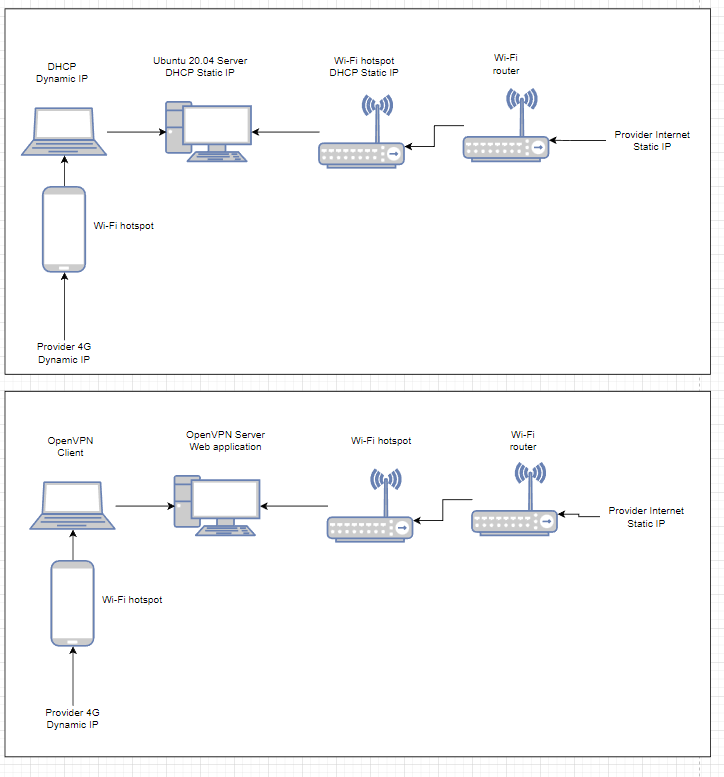
port of openvpn server is opened by the command:
`ufw allow 9026`
Firewall in OS Windows is off.
What can be the reason of such operations, problems?
---
### Author:  [@zach](https://forum.pritunl.com/u/zach)
#### Post date: [February 4, 2023, 9:52pm UTC](https://forum.pritunl.com/t/internet-is-broken-on-windows-with-vpn/751/2 "2023-02-04T21:52:17Z")
The VPN connection is likely disrupting access to the DNS server configured on the client, possibly from the route pushed. The client will need to be configured to use a different DNS.
---
### Author:  [@range-vs](https://forum.pritunl.com/u/range-vs)
#### Post date: [February 4, 2023, 10:22pm UTC](https://forum.pritunl.com/t/internet-is-broken-on-windows-with-vpn/751/3 "2023-02-04T22:22:47Z")
Thanks a lot for your answer!
It happens to every client on OS Windows. Shall I customise every client separately?
It sounds like a strange way to solve my problem.
---
### Author:  [@zach](https://forum.pritunl.com/u/zach)
#### Post date: [February 4, 2023, 10:24pm UTC](https://forum.pritunl.com/t/internet-is-broken-on-windows-with-vpn/751/4 "2023-02-04T22:24:47Z")
DNS can be pushed from the server with `push "dhcp-option DNS 8.8.8.8"`
---
### Author:  [@range-vs](https://forum.pritunl.com/u/range-vs)
#### Post date: [February 4, 2023, 10:35pm UTC](https://forum.pritunl.com/t/internet-is-broken-on-windows-with-vpn/751/5 "2023-02-04T22:35:27Z")
How can I make it in interface pritunl? I’ve been looking for it for a very long time but I didn’t find
---
### Author:  [@zach](https://forum.pritunl.com/u/zach)
#### Post date: [February 4, 2023, 10:36pm UTC](https://forum.pritunl.com/t/internet-is-broken-on-windows-with-vpn/751/6 "2023-02-04T22:36:57Z")
The DNS server is configured in the server settings.
---
### Author:  [@range-vs](https://forum.pritunl.com/u/range-vs)
#### Post date: [February 4, 2023, 11:08pm UTC](https://forum.pritunl.com/t/internet-is-broken-on-windows-with-vpn/751/7 "2023-02-04T23:08:58Z")
I’ve tried everything pictured on the screenshot:
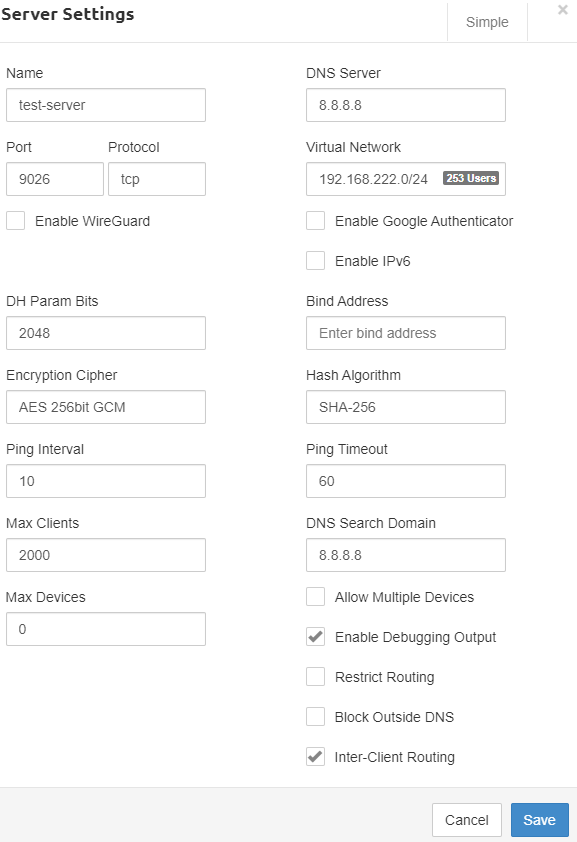
The option push “dhcp-option DNS 8.8.8.8” can’t be added to server configuration.
I watch server configuration this way (During started server):
ps -ef | grep openvpn
cat /tmp/pritunl\_xxx/openvpn.conf
---
### Author:  [@zach](https://forum.pritunl.com/u/zach)
#### Post date: [February 4, 2023, 11:59pm UTC](https://forum.pritunl.com/t/internet-is-broken-on-windows-with-vpn/751/8 "2023-02-04T23:59:16Z")
It is configured to send the DNS server. This is sent on connection to the client, it wouldn’t be shown in the server configuration.
This is some other issue. There may be a static DNS server configured on the Windows device that would take priority over the DNS server from the VPN connection. You could also try adding `8.8.8.8/32` to the server routes.
---
### Author:  [@range-vs](https://forum.pritunl.com/u/range-vs)
#### Post date: [February 5, 2023, 9:27am UTC](https://forum.pritunl.com/t/internet-is-broken-on-windows-with-vpn/751/9 "2023-02-05T09:27:14Z")
The point is, I can connect to other VPN servers and DNS works correctly.
> You could also try adding `8.8.8.8/32` to the server routes.
Does it indicate that major part of traffic will pass through OpenVPN?
---
### Author:  [@zach](https://forum.pritunl.com/u/zach)
#### Post date: [February 5, 2023, 11:24pm UTC](https://forum.pritunl.com/t/internet-is-broken-on-windows-with-vpn/751/10 "2023-02-05T23:24:58Z")
No that would route DNS traffic.
---
### Author:  [@range-vs](https://forum.pritunl.com/u/range-vs)
#### Post date: [February 6, 2023, 7:50pm UTC](https://forum.pritunl.com/t/internet-is-broken-on-windows-with-vpn/751/11 "2023-02-06T19:50:06Z")
Your idea works great. Thanks a lot!