# Not install
**URL:** https://forum.pritunl.com/t/not-install/1074
**Category:** Pritunl VPN
**Created:** [May 31, 2023, 1:53pm UTC](https://forum.pritunl.com/t/not-install/1074 "2023-05-31T13:53:14Z")
**Posts on this page:** 9
**Page:** 1
### Author:  [@markkats](https://forum.pritunl.com/u/markkats)
#### Post date: [May 31, 2023, 1:53pm UTC](https://forum.pritunl.com/t/not-install/1074/1 "2023-05-31T13:53:14Z")
Ubuntu 20. I install it according to the script from the Main page:
sudo tee /etc/apt/sources.list.d/mongodb-org-6.0.list \<\< EOF
deb [MongoDB Repositories](https://repo.mongodb.org/apt/ubuntu) focal/mongodb-org/6.0 multiverse
EOF
sudo tee /etc/apt/sources.list.d/pritunl.list \<\< EOF
deb [https://repo.pritunl.com/stable/apt](https://repo.pritunl.com/stable/apt) focal main
EOF
sudo apt --assume-yes install gnupg
wget -qO- [https://www.mongodb.org/static/pgp/server-6.0.asc](https://www.mongodb.org/static/pgp/server-6.0.asc) | sudo tee /etc/apt/trusted.gpg.d/mongodb-org-6.0.asc
gpg --keyserver hkp://keyserver.ubuntu.com --recv-keys 7568D9BB55FF9E5287D586017AE645C0CF8E292A
gpg --armor --export 7568D9BB55FF9E5287D586017AE645C0CF8E292A | sudo tee /etc/apt/trusted.gpg.d/pritunl.asc
sudo apt update
sudo apt --assume-yes install pritunl mongodb-org
sudo systemctl start pritunl mongod
sudo systemctl enable pritunl mongod
Ubuntu 22. Installed according to the script from this page - [https://techviewleo.com/install-pritunl-vpn-on-ubuntu-server/](https://techviewleo.com/install-pritunl-vpn-on-ubuntu-server/)
In both cases, nothing starts. it’s:
unpacking pritunl (1.32.3504.68-0ubuntu1~jammy) … dpkg: error processing archive /var/cache/apt/archives/pritunl\_1.32.3504.68-0ubuntu1~jammy\_amd64.deb (–unpack): cannot copy extracted data for ‘./usr/lib/pritunl/usr/lib/libpython3.9.a’ to ‘/usr/lib/pritunl/usr/lib/libpython3.9.a.dpkg-new’: failed to write (no space left on device) no apport report written because the error message indicates a disk full error dpkg-deb: error: paste subprocess was killed by signal (broken pipe) errors were encountered while processing: /var/cache/apt/archives/pritunl\_1.32.3504.68-0ubuntu1~jammy\_amd64.deb e: sub-process /usr/bin/dpkg returned an error code (1) failed to enable unit: unit file pritunl.service does not exist. failed to start pritunl.service: unit pritunl.service not found.
Something else. I install it on a clean server. why doesn’t it work?
And yesterday I successfully connected to the control panel and added users, but none of the old and new users could access the Internet while connected to my server. What should I do?
---
### Author:  [@markkats](https://forum.pritunl.com/u/markkats)
#### Post date: [May 31, 2023, 1:59pm UTC](https://forum.pritunl.com/t/not-install/1074/2 "2023-05-31T13:59:00Z")
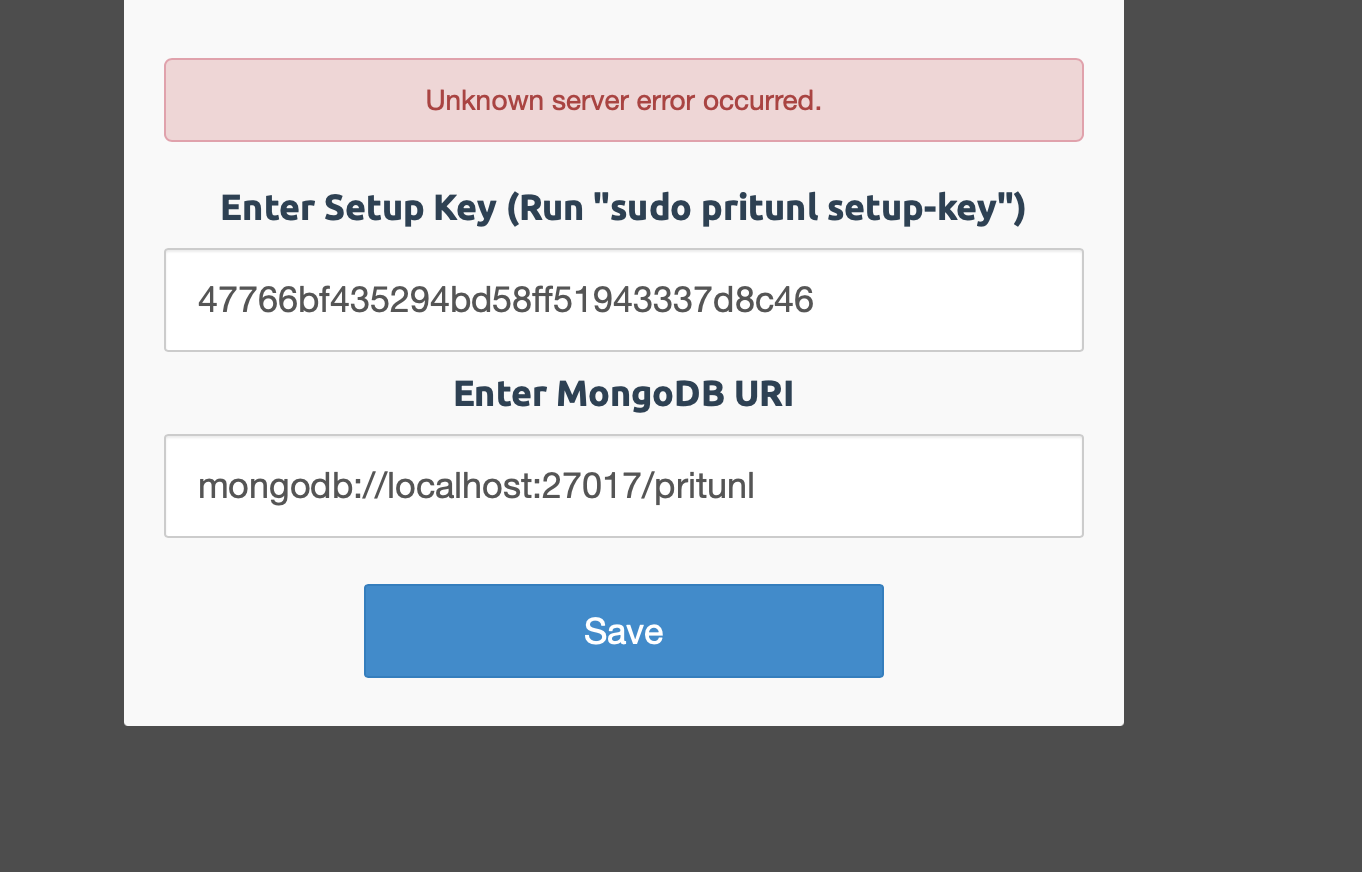
If the installation is successful, I get such an error
---
### Author:  [@markkats](https://forum.pritunl.com/u/markkats)
#### Post date: [May 31, 2023, 3:08pm UTC](https://forum.pritunl.com/t/not-install/1074/3 "2023-05-31T15:08:55Z")
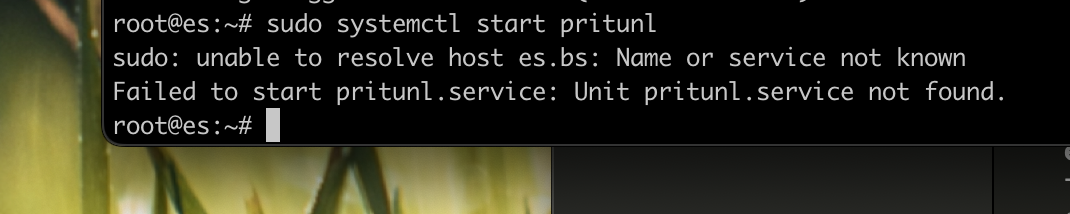
After installing the script with the main pritunl, there is still such an error
So how can I install pritunl?
---
### Author:  [@markkats](https://forum.pritunl.com/u/markkats)
#### Post date: [May 31, 2023, 3:19pm UTC](https://forum.pritunl.com/t/not-install/1074/4 "2023-05-31T15:19:35Z")
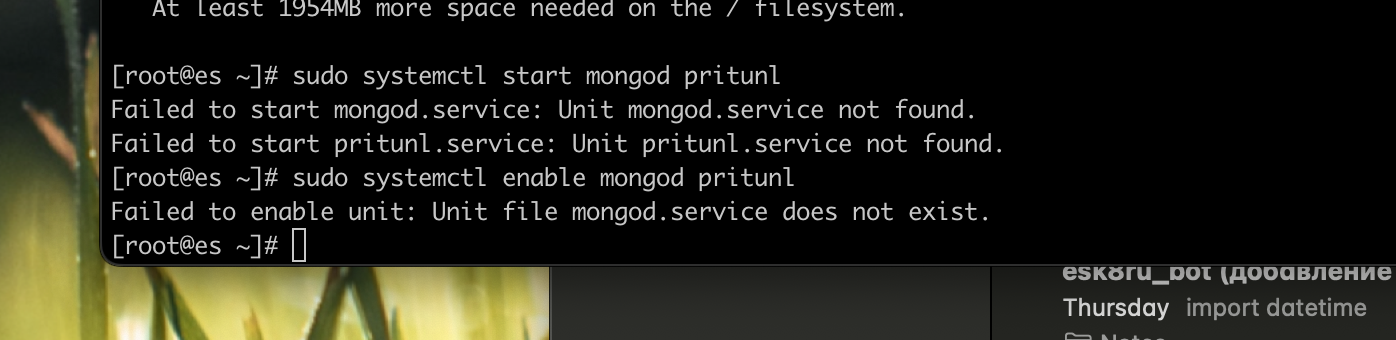
I reset the server 20 times, installed CentrOS8 and the same thing is not installed. What’s the problem?
---
### Author:  [@markkats](https://forum.pritunl.com/u/markkats)
#### Post date: [May 31, 2023, 5:37pm UTC](https://forum.pritunl.com/t/not-install/1074/5 "2023-05-31T17:37:08Z")
In short, having killed a few hours, I couldn’t install it.
Earlier on this server for more than a year everything worked perfectly and pritunl too. yesterday pritunl stopped releasing on the Internet. today I tried to reinstall and is not installed. I used a bunch of instructions from the Internet, including official ones.
Why can’t I install it? You have been answering questions here for a very long time (previous time I waited for an answer for 2 days), how to speed up?
---
### Author:  [@zach](https://forum.pritunl.com/u/zach)
#### Post date: [May 31, 2023, 6:41pm UTC](https://forum.pritunl.com/t/not-install/1074/6 "2023-05-31T18:41:39Z")
It appears the server ran out of disk space when installing. The v1.32 releases are packaged with a Python 3.9 interrupter and require more disk space.
---
### Author:  [@markkats](https://forum.pritunl.com/u/markkats)
#### Post date: [May 31, 2023, 10:36pm UTC](https://forum.pritunl.com/t/not-install/1074/7 "2023-05-31T22:36:07Z")
5 GB disk, after installing the system on it freely 2.6 GB. after installing the script free 0.8-1 GB. I don’t think it’s all about it, since earlier everything worked stably on the same server in the same configuration.
I have 2 more servers where there is pritunl and there are also 5 GB, everything works well.
---
### Author:  [@markkats](https://forum.pritunl.com/u/markkats)
#### Post date: [June 2, 2023, 7:02pm UTC](https://forum.pritunl.com/t/not-install/1074/8 "2023-06-02T19:02:30Z")
So what can I check? I can’t even install a 10GB server
---
### Author:  [@zach](https://forum.pritunl.com/u/zach)
#### Post date: [June 4, 2023, 6:39pm UTC](https://forum.pritunl.com/t/not-install/1074/9 "2023-06-04T18:39:08Z")
The server will need enough space to allow the installation to complete without showing the error `failed to write (no space left on device)`. If this error occurs the package is likely in an incomplete state and will need to be removed and reinstalled.