Hello @zach ,
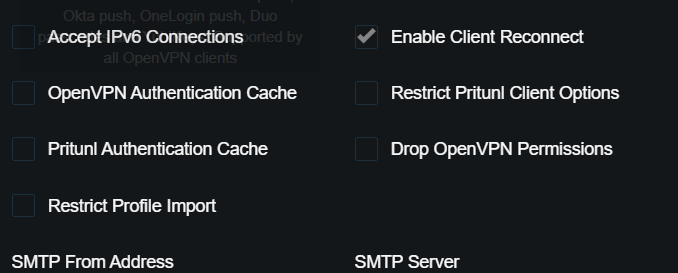
Sorry for the delay for this reply. So You will find the client log, after a “sudo systemctl stop pritunl” on node01. And we would have expected to be reconnected to node02. We can see the client trying but failing. In the node02 log, we see:
==> /var/log/pritunl.log <==
[node02][2026-08-06 14:55:59,470][INFO] Authenticating user
user_name = “myusername@myorg.com”
factors = [“azure”]
And the client failed to reconnect.
Service log :
2026-08-06 16:55:45 us=171000 268 variation(s) on previous 4 message(s) suppressed by --mute
2026-08-06 16:55:45 us=171000 Connection reset, restarting [0]
2026-08-06 16:55:45 us=171000 TCP/UDP: Closing socket
2026-08-06 16:55:45 us=187000 SIGUSR1[soft,connection-reset] received, process restarting
2026-08-06 16:55:45 us=187000 Restart pause, 2 second(s)
2026-08-06 16:55:47 us=203000 Re-using SSL/TLS context
2026-08-06 16:55:47 us=203000 Outgoing Control Channel Authentication: Using 160 bit message hash ‘SHA1’ for HMAC authentication
2026-08-06 16:55:47 us=203000 NOTE: --mute triggered…
2026-08-06 16:55:47 us=203000 1 variation(s) on previous 4 message(s) suppressed by --mute
2026-08-06 16:55:47 us=203000 Control Channel MTU parms [ mss_fix:0 max_frag:0 tun_mtu:1250 tun_max_mtu:0 headroom:126 payload:1600 tailroom:126 ET:0 ]
2026-08-06 16:55:47 us=203000 NOTE: --mute triggered…
2026-08-06 16:55:47 us=203000 1 variation(s) on previous 4 message(s) suppressed by --mute
2026-08-06 16:55:47 us=203000 TCP/UDP: Preserving recently used remote address: [AF_INET]node01:8443
2026-08-06 16:55:47 us=203000 Socket Buffers: R=[65536->393216] S=[64512->393216]
2026-08-06 16:55:47 us=203000 Attempting to establish TCP connection with [AF_INET]node01:8443
2026-08-06 16:55:51 us=234000 TCP: connect to [AF_INET]node01:8443 failed: Unknown error
2026-08-06 16:55:51 us=234000 SIGUSR1[connection failed(soft),connection-failed] received, process restarting
2026-08-06 16:55:51 us=234000 Restart pause, 2 second(s)
2026-08-06 16:55:53 us=265000 Re-using SSL/TLS context
2026-08-06 16:55:53 us=265000 Outgoing Control Channel Authentication: Using 160 bit message hash ‘SHA1’ for HMAC authentication
2026-08-06 16:55:53 us=265000 NOTE: --mute triggered…
2026-08-06 16:55:53 us=265000 1 variation(s) on previous 4 message(s) suppressed by --mute
2026-08-06 16:55:53 us=265000 Control Channel MTU parms [ mss_fix:0 max_frag:0 tun_mtu:1250 tun_max_mtu:0 headroom:126 payload:1600 tailroom:126 ET:0 ]
2026-08-06 16:55:53 us=265000 NOTE: --mute triggered…
2026-08-06 16:55:53 us=265000 1 variation(s) on previous 4 message(s) suppressed by --mute
2026-08-06 16:55:53 us=265000 TCP/UDP: Preserving recently used remote address: [AF_INET]node01:8443
2026-08-06 16:55:53 us=265000 Socket Buffers: R=[65536->393216] S=[64512->393216]
2026-08-06 16:55:53 us=265000 Attempting to establish TCP connection with [AF_INET]node01:8443
2026-08-06 16:55:57 us=281000 TCP: connect to [AF_INET]node01:8443 failed: Unknown error
2026-08-06 16:55:57 us=281000 SIGUSR1[connection failed(soft),connection-failed] received, process restarting
2026-08-06 16:55:57 us=281000 Restart pause, 2 second(s)
2026-08-06 16:55:59 us=296000 Re-using SSL/TLS context
2026-08-06 16:55:59 us=296000 Outgoing Control Channel Authentication: Using 160 bit message hash ‘SHA1’ for HMAC authentication
2026-08-06 16:55:59 us=296000 NOTE: --mute triggered…
2026-08-06 16:55:59 us=296000 1 variation(s) on previous 4 message(s) suppressed by --mute
2026-08-06 16:55:59 us=312000 Control Channel MTU parms [ mss_fix:0 max_frag:0 tun_mtu:1250 tun_max_mtu:0 headroom:126 payload:1600 tailroom:126 ET:0 ]
2026-08-06 16:55:59 us=312000 NOTE: --mute triggered…
2026-08-06 16:55:59 us=312000 1 variation(s) on previous 4 message(s) suppressed by --mute
2026-08-06 16:55:59 us=312000 TCP/UDP: Preserving recently used remote address: [AF_INET]node02:8443
2026-08-06 16:55:59 us=312000 Socket Buffers: R=[65536->393216] S=[64512->393216]
2026-08-06 16:55:59 us=312000 Attempting to establish TCP connection with [AF_INET]node02:8443
2026-08-06 16:55:59 us=328000 NOTE: --mute triggered…
2026-08-06 16:55:59 us=343000 3 variation(s) on previous 4 message(s) suppressed by --mute
2026-08-06 16:55:59 us=343000 TLS: Initial packet from [AF_INET]node02:8443, sid=b505b141 4fa56ec9
2026-08-06 16:55:59 us=421000 NOTE: --mute triggered…
2026-08-06 16:55:59 us=453000 7 variation(s) on previous 4 message(s) suppressed by --mute
2026-08-06 16:55:59 us=453000 [691704cb38ec76efbcc8845f] Peer Connection Initiated with [AF_INET]node02:8443
2026-08-06 16:55:59 us=453000 TLS: move_session: dest=TM_ACTIVE src=TM_INITIAL reinit_src=1
2026-08-06 16:55:59 us=453000 NOTE: --mute triggered…
2026-08-06 16:55:59 us=531000 1 variation(s) on previous 4 message(s) suppressed by --mute
2026-08-06 16:55:59 us=531000 AUTH: Received control message: AUTH_FAILED
2026-08-06 16:55:59 us=531000 TCP/UDP: Closing socket
2026-08-06 16:55:59 us=531000 C:\WINDOWS\system32\route.exe DELETE 10.100.0.0 MASK 255.255.0.0 172.22.0.1
2026-08-06 16:55:59 us=546000 NOTE: --mute triggered…
2026-08-06 16:56:00 us=656000 177 variation(s) on previous 4 message(s) suppressed by --mute
2026-08-06 16:56:00 us=656000 Closing tap-windows6 interface
2026-08-06 16:56:00 us=828000 TAP: DHCP address released
2026-08-06 16:56:00 us=828000 SIGTERM[soft,auth-failure] received, process exiting
Profile log :
[2026-08-06 16:55:59][INFO]  connection: Stopping reconnect ◆ client_disconnect=false ◆ client_disconnect_waiters=0 ◆ client_disconnected=false ◆ client_provider=true ◆ client_startime=4224 ◆ data_iface=“” ◆ data_mode=“” ◆ data_remotes=string{“synchostname.myorg.com*”, “node01”, “node02”} ◆ data_status=“connected” ◆ data_timestamp=1786028156 ◆ data_tun_iface=“” ◆ ovpn_auth_failed=true ◆ ovpn_cmd=true ◆ ovpn_connected=true ◆ ovpn_dir=“C:\Program Files (x86)\Pritunl\openvpn” ◆ ovpn_last_auth_failed=-1 ◆ ovpn_management_pass=true ◆ ovpn_management_port=9701 ◆ ovpn_path=“C:\Program Files (x86)\Pritunl\openvpn\openvpn.exe” ◆ ovpn_remotes=string{“node01(8443/tcp-client)”, “node01(8443/tcp-client)”, “node02(8443/tcp-client)”} ◆ ovpn_running=1 ◆ ovpn_tap_iface=“Pritunl 1” ◆ profile_dco=false ◆ profile_device_auth=false ◆ profile_disable_dns=false ◆ profile_disable_gateway=false ◆ profile_dynamic_firewall=false ◆ profile_force_connect=false ◆ profile_force_dns=false ◆ profile_geo_sort=false ◆ profile_id=“b701a05dc2172052” ◆ profile_mode=“ovpn” ◆ profile_reconnect=true ◆ profile_sso_auth=true ◆ profile_system_profile=false ◆ profile_timeout=false ◆ reason=“ovpn_auth_error” ◆ state_closed=false ◆ state_closed_waiters=0 ◆ state_deadline=false ◆ state_delay=false ◆ state_id=“64fb2993fea856c3” ◆ state_interactive=true ◆ state_no_reconnect=false ◆ state_stop=false ◆ state_system_interactive=false ◆ state_temp_paths=string{“C:\ProgramData\Pritunl\Temp\b701a05dc2172052-management.txt”, “C:\ProgramData\Pritunl\Temp\b701a05dc2172052”, “C:\ProgramData\Pritunl\Temp\b701a05dc2172052.auth”, “C:\ProgramData\Pritunl\Temp\b701a05dc2172052-block.bat”} ◆ state_time=time.Date(2026, time.August, 6, 15, 45, 35, 37465600, time.Local) ◆ wg_bash_path=“” ◆ wg_conf_path=“” ◆ wg_conf_path2=“” ◆ wg_connected=false ◆ wg_last_handshake=0 ◆ wg_path=“C:\Program Files (x86)\Pritunl\wireguard\wg.exe” ◆ wg_priv_key=false ◆ wg_pub_key=false ◆ wg_quick_path=“C:\Program Files (x86)\Pritunl\wireguard\wg-quick.exe” ◆ wg_server_pub_key=false ◆ wg_sso_start=time.Date(1, time.January, 1, 0, 0, 0, 0, time.UTC) ◆ wg_sso_token=false ◆ wg_util_path=“C:\Program Files (x86)\Pritunl\wireguard\wireguard.exe”
[2026-08-06 16:56:02][ERRO] connection: Disconnecting ◆ client_disconnect=true ◆ client_disconnect_waiters=0 ◆ client_disconnected=false ◆ client_provider=true ◆ client_startime=4227 ◆ data_iface=“” ◆ data_mode=“” ◆ data_remotes=string{“synchostname.myorg.com*”, “node01”, “node02”} ◆ data_status=“connected” ◆ data_timestamp=1786028156 ◆ data_tun_iface=“” ◆ ovpn_auth_failed=true ◆ ovpn_cmd=true ◆ ovpn_connected=true ◆ ovpn_dir=“C:\Program Files (x86)\Pritunl\openvpn” ◆ ovpn_last_auth_failed=0 ◆ ovpn_management_pass=true ◆ ovpn_management_port=9701 ◆ ovpn_path=“C:\Program Files (x86)\Pritunl\openvpn\openvpn.exe” ◆ ovpn_remotes=string{“node01(8443/tcp-client)”, “node01(8443/tcp-client)”, “node02(8443/tcp-client)”} ◆ ovpn_running=-1 ◆ ovpn_tap_iface=“Pritunl 1” ◆ profile_dco=false ◆ profile_device_auth=false ◆ profile_disable_dns=false ◆ profile_disable_gateway=false ◆ profile_dynamic_firewall=false ◆ profile_force_connect=false ◆ profile_force_dns=false ◆ profile_geo_sort=false ◆ profile_id=“b701a05dc2172052” ◆ profile_mode=“ovpn” ◆ profile_reconnect=true ◆ profile_sso_auth=true ◆ profile_system_profile=false ◆ profile_timeout=false ◆ state_closed=false ◆ state_closed_waiters=0 ◆ state_deadline=false ◆ state_delay=false ◆ state_id=“64fb2993fea856c3” ◆ state_interactive=true ◆ state_no_reconnect=true ◆ state_stop=true ◆ state_system_interactive=false ◆ state_temp_paths=string{“C:\ProgramData\Pritunl\Temp\b701a05dc2172052-management.txt”, “C:\ProgramData\Pritunl\Temp\b701a05dc2172052”, “C:\ProgramData\Pritunl\Temp\b701a05dc2172052.auth”, “C:\ProgramData\Pritunl\Temp\b701a05dc2172052-block.bat”} ◆ state_time=time.Date(2026, time.August, 6, 15, 45, 35, 37465600, time.Local) ◆ wg_bash_path=“” ◆ wg_conf_path=“” ◆ wg_conf_path2=“” ◆ wg_connected=false ◆ wg_last_handshake=0 ◆ wg_path=“C:\Program Files (x86)\Pritunl\wireguard\wg.exe” ◆ wg_priv_key=false ◆ wg_pub_key=false ◆ wg_quick_path=“C:\Program Files (x86)\Pritunl\wireguard\wg-quick.exe” ◆ wg_server_pub_key=false ◆ wg_sso_start=time.Date(1, time.January, 1, 0, 0, 0, 0, time.UTC) ◆ wg_sso_token=false ◆ wg_util_path=“C:\Program Files (x86)\Pritunl\wireguard\wireguard.exe”
[2026-08-06 16:56:04][INFO] profile: Disconnected without restart ◆ client_disconnect=true ◆ client_disconnect_waiters=0 ◆ client_disconnected=true ◆ client_provider=true ◆ client_startime=4229 ◆ data_iface=“” ◆ data_mode=“” ◆ data_remotes=string{“synchostname.myorg.com*”, “node01”, “node02”} ◆ data_status=“disconnected” ◆ data_timestamp=0 ◆ data_tun_iface=“” ◆ ovpn_auth_failed=true ◆ ovpn_cmd=true ◆ ovpn_connected=true ◆ ovpn_dir=“C:\Program Files (x86)\Pritunl\openvpn” ◆ ovpn_last_auth_failed=2 ◆ ovpn_management_pass=true ◆ ovpn_management_port=9701 ◆ ovpn_path=“C:\Program Files (x86)\Pritunl\openvpn\openvpn.exe” ◆ ovpn_remotes=string{“node01(8443/tcp-client)”, “node01(8443/tcp-client)”, “node02(8443/tcp-client)”} ◆ ovpn_running=-1 ◆ ovpn_tap_iface=“Pritunl 1” ◆ profile_dco=false ◆ profile_device_auth=false ◆ profile_disable_dns=false ◆ profile_disable_gateway=false ◆ profile_dynamic_firewall=false ◆ profile_force_connect=false ◆ profile_force_dns=false ◆ profile_geo_sort=false ◆ profile_id=“b701a05dc2172052” ◆ profile_mode=“ovpn” ◆ profile_reconnect=true ◆ profile_sso_auth=true ◆ profile_system_profile=false ◆ profile_timeout=false ◆ state_closed=true ◆ state_closed_waiters=0 ◆ state_deadline=false ◆ state_delay=false ◆ state_id=“64fb2993fea856c3” ◆ state_interactive=true ◆ state_no_reconnect=true ◆ state_stop=true ◆ state_system_interactive=false ◆ state_temp_paths=string{“C:\ProgramData\Pritunl\Temp\b701a05dc2172052-management.txt”, “C:\ProgramData\Pritunl\Temp\b701a05dc2172052”, “C:\ProgramData\Pritunl\Temp\b701a05dc2172052.auth”, “C:\ProgramData\Pritunl\Temp\b701a05dc2172052-block.bat”} ◆ state_time=time.Date(2026, time.August, 6, 15, 45, 35, 37465600, time.Local) ◆ wg_bash_path=“” ◆ wg_conf_path=“” ◆ wg_conf_path2=“” ◆ wg_connected=false ◆ wg_last_handshake=0 ◆ wg_path=“C:\Program Files (x86)\Pritunl\wireguard\wg.exe” ◆ wg_priv_key=false ◆ wg_pub_key=false ◆ wg_quick_path=“C:\Program Files (x86)\Pritunl\wireguard\wg-quick.exe” ◆ wg_server_pub_key=false ◆ wg_sso_start=time.Date(1, time.January, 1, 0, 0, 0, 0, time.UTC) ◆ wg_sso_token=false ◆ wg_util_path=“C:\Program Files (x86)\Pritunl\wireguard\wireguard.exe”
[2026-08-06 16:56:05][ERRO] connection: Failed to get interface address ◆ client_disconnect=true ◆ client_disconnect_waiters=0 ◆ client_disconnected=true ◆ client_provider=true ◆ client_startime=4230 ◆ data_iface=“” ◆ data_mode=“” ◆ data_remotes=string{“synchostname.myorg.com*”, “node01”, “node02”} ◆ data_status=“disconnected” ◆ data_timestamp=0 ◆ data_tun_iface=“” ◆ output=“\r\nConfiguration pour l’interface «\u00a0Pritunl 1\u00a0»\r\n DHCP activé: Oui\r\n Métrique de l’interface\u00a0: 5\r\n\r\n” ◆ ovpn_auth_failed=true ◆ ovpn_cmd=true ◆ ovpn_connected=true ◆ ovpn_dir=“C:\Program Files (x86)\Pritunl\openvpn” ◆ ovpn_last_auth_failed=2 ◆ ovpn_management_pass=true ◆ ovpn_management_port=9701 ◆ ovpn_path=“C:\Program Files (x86)\Pritunl\openvpn\openvpn.exe” ◆ ovpn_remotes=string{“node01(8443/tcp-client)”, “node01(8443/tcp-client)”, “node02(8443/tcp-client)”} ◆ ovpn_running=-1 ◆ ovpn_tap_iface=“Pritunl 1” ◆ profile_dco=false ◆ profile_device_auth=false ◆ profile_disable_dns=false ◆ profile_disable_gateway=false ◆ profile_dynamic_firewall=false ◆ profile_force_connect=false ◆ profile_force_dns=false ◆ profile_geo_sort=false ◆ profile_id=“b701a05dc2172052” ◆ profile_mode=“ovpn” ◆ profile_reconnect=true ◆ profile_sso_auth=true ◆ profile_system_profile=false ◆ profile_timeout=false ◆ state_closed=true ◆ state_closed_waiters=0 ◆ state_deadline=false ◆ state_delay=false ◆ state_id=“64fb2993fea856c3” ◆ state_interactive=true ◆ state_no_reconnect=true ◆ state_stop=true ◆ state_system_interactive=false ◆ state_temp_paths=string{“C:\ProgramData\Pritunl\Temp\b701a05dc2172052-management.txt”, “C:\ProgramData\Pritunl\Temp\b701a05dc2172052”, “C:\ProgramData\Pritunl\Temp\b701a05dc2172052.auth”, “C:\ProgramData\Pritunl\Temp\b701a05dc2172052-block.bat”} ◆ state_time=time.Date(2026, time.August, 6, 15, 45, 35, 37465600, time.Local) ◆ wg_bash_path=“” ◆ wg_conf_path=“” ◆ wg_conf_path2=“” ◆ wg_connected=false ◆ wg_last_handshake=0 ◆ wg_path=“C:\Program Files (x86)\Pritunl\wireguard\wg.exe” ◆ wg_priv_key=false ◆ wg_pub_key=false ◆ wg_quick_path=“C:\Program Files (x86)\Pritunl\wireguard\wg-quick.exe” ◆ wg_server_pub_key=false ◆ wg_sso_start=time.Date(1, time.January, 1, 0, 0, 0, 0, time.UTC) ◆ wg_sso_token=false ◆ wg_util_path=“C:\Program Files (x86)\Pritunl\wireguard\wireguard.exe”
Best regards
Eric