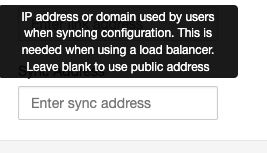
We are using an enterprise subscription and we don’t use any type of load balancer in front of your VPN hosts but still clients are facing the error from the topic title.
As far as I understand based on the info pop-up:
if we don’t use load balancer this should be using the host public address by default, is that the case or this info message is misleading us somehow ?
If I set this manually now when all of my clients are already connected to the VPNs we have should we download their config files all over again and reconnect them back again?
The configuration sync hosts can be viewed by clicking settings on the profile in the client. If those hosts are incorrect the profile needs to be imported again. Configuration sync requires the HTTPS port to be open and an enterprise license on the server.
How often is this sync happening, is it crontab like ?
My hosts(EC2) security group allow HTTPS only from the VPN servers configured within the PritunlVPN itself.
Should port 443 be open to 0.0.0.0/0 ?
I can see the sync hosts in my VPN client but it still displays “Failed to sync” even after re-import.
What about clients that don’t use Pritunl client, does it mean every time we made a change on the VPN server(e.g adding new route or enable/disable any other server config) these clients are connected they will have to download their configuration all over again?
What kind of changes can be automatically sync, I tried to find any documentation or example of this but without any luck, could you explain, please?
The client sends a hash of the configuration to the server if the configuration has changed it returns the updated configuration. This is done at the start of each connection by sending a HTTPS request to the sync hosts shown in the profile settings. The server must have an enterprise subscription.
We are using enterprise license for all our hosts.
The solution is hosted in AWS.
Usually port 443(HTTPS) is used to access the UI but if I understand it correctly in Pritunl is also used to sync some kind of configurations(not clear yet what kind of configurations as it is not described anywhere) and as I have described earlier via some DNS settings we managed to achieve access to port 443 only if peer is connected to VPN server/s managed by Pritunl.
The questions that still remains are:
If port 443(HTTPS) is not open to 0.0.0.0/0 but only to the subnet of VPN server managed by Pritunl does this mean the sync is not going to work?
What kind of configurations are supposed to be sync exactly during “the start of each connection” Could you collaborate a bit more, please?
The HTTPS request is sent before connecting to the VPN, if a VPN connection is needed to access the web server it won’t work. It returns JSON data of the profile that excludes private keys.
Having that said if I understand it correctly if we want to have client sync working we need to expose HTTPS to 0.0.0.0/0, can you confirm this ?
I didn’t understand what kind of configurations are going to sync via this sync operations exactly, may you provide more details on the matter?
Also is there any way to enable/disable UI login capabilities ?
Yes the HTTPS port would need to be open. Configuration sync is not required it can be updated by re-importing the profile into the client. There’s no option to disable the login UI.