By default Google Workspace and Microsoft Azure Entra configurations allow non-administrator users inside the company to create groups. If these groups are used to control access in Pritunl and Pritunl Zero this can allow employees in the organization to gain additional permissions by creating a group. Follow the instructions below for Google Workspace and Azure Entra to block non-administrator employees from creating groups. Flowcharts are also available below that detail this issue.
Google Workspace provides a filter to select only administrator created groups. This will be used in the latest versions of Pritunl and Pritunl Zero. Microsoft Azure Entra does have a distinction between security groups and non-security groups but by default all users can create both types of groups. Pritunl Zero by default will only accept security groups and Pritunl will continue to accept both types to maintain compatibility with older Azure AD configurations.
Pritunl Cloud the KVM based self hosted cloud platform under development which shares a codebase with Pritunl Zero will also limit groups in the upcoming 1.4 stable release. This is expected in the coming weeks.
Additionally in Pritunl Zero when a single sign-on request is initiated and the user already has an active session the single sign-on callback was forwarded to the internal service. This would still require the internal service to maliciously utilize the callback to create a new user session with it. This occurs because Pritunl Zero will forward all web requests to the internal service and no checks were in place to stop the forwarding of the Pritunl Zero single sign-on callback. This requires the trusted internal service already configured in Pritunl Zero to act maliciously. This has been fixed in v1.0.4018.44. Flowcharts below detail this issue.
These issues were reported by Ozgun Kultekin from Wakefield.
Google Workspace
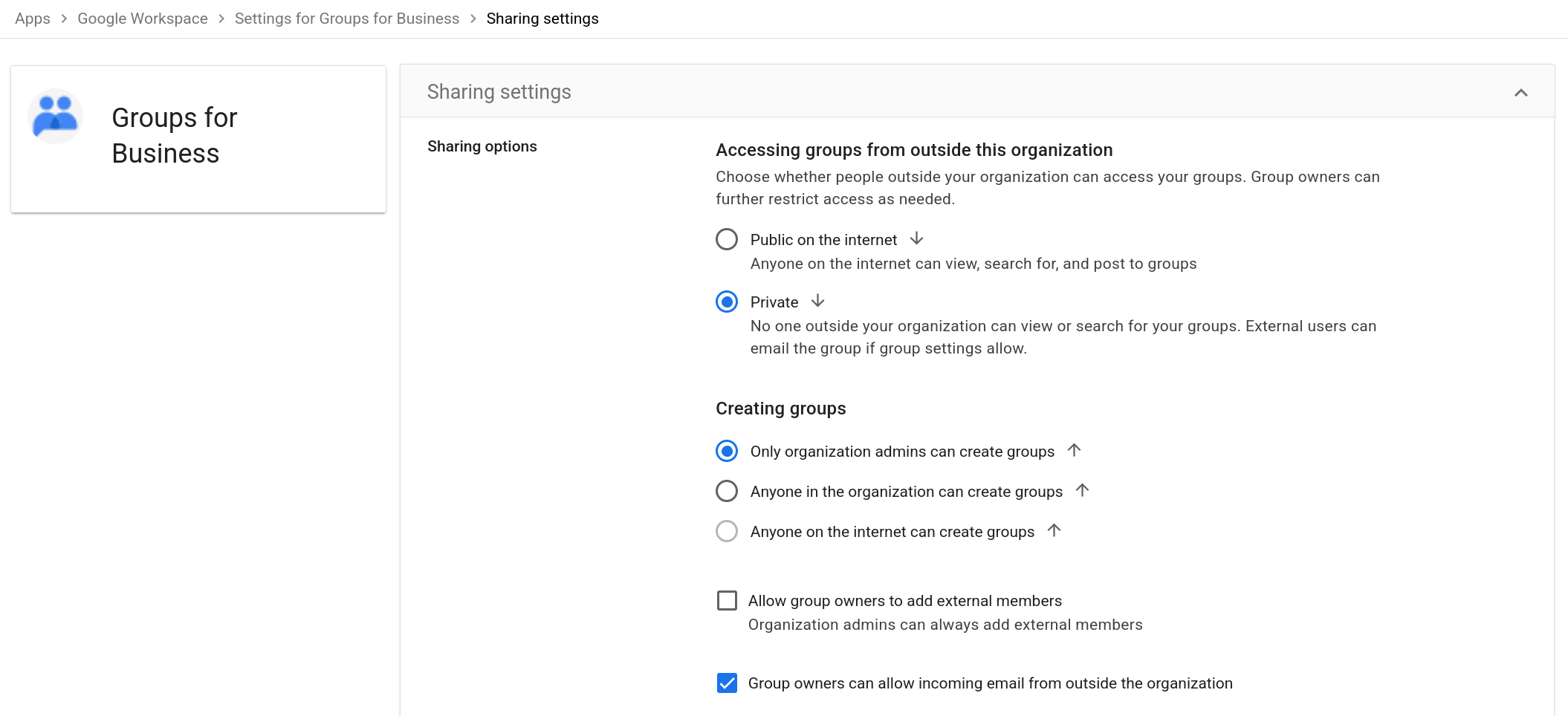
In the Google Workspace admin console open Apps → Google Workspace → Settings for Groups for Business → Sharing Settings. Then select Only organization admins can create groups.
In general it is not recommended to allow non-administrators to create groups even without Pritunl as this allows any employee to create any forwarding email address as long as that email address doesn’t exist or existed and was later deleted. This creates an email impersonation risk under the company domain.
Microsoft Azure Entra
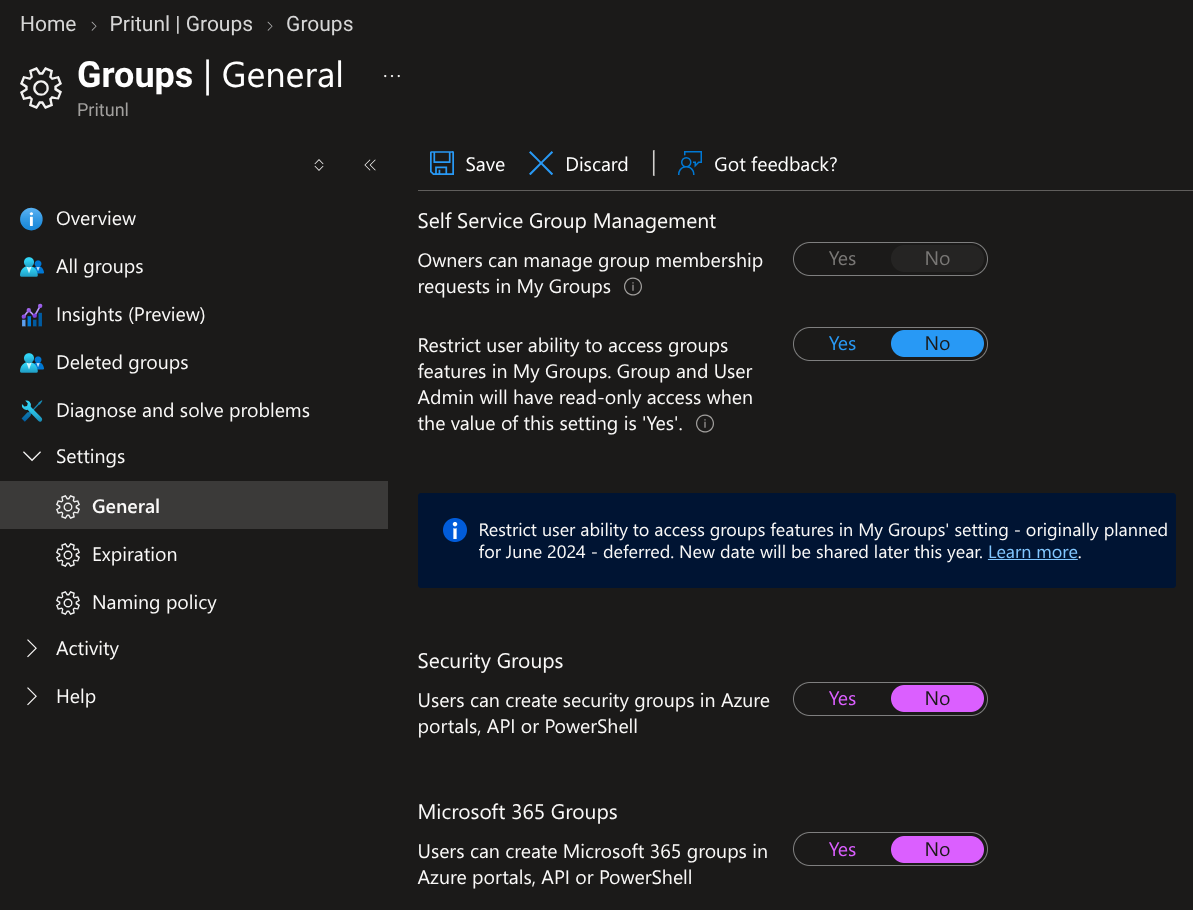
In the Azure admin console open Microsoft Entra ID then select Manage → Groups → Settings → General. Then set the Security Groups and Microsoft 365 Groups options to no.
Continue Allowing User Groups
Commands have been added to Pritunl and Pritunl Zero to control group selection with Google Workspace and Microsoft Azure Entra. Running the commands below will allow user created groups.
sudo pritunl set app.sso_azure_security_groups_only false # default false
sudo pritunl set app.sso_google_admin_groups_only false # default true

sudo pritunl-zero set auth azure_security_groups_only false # default true
sudo pritunl-zero set auth google_admin_groups_only false # default true
Pritunl and Pritunl Zero Groups Vulnerability Flowchart
%%{init: {'flowchart': {'wrappingWidth': 450}}}%%
flowchart TD
    A["Employee has an active Google Workspace or Azure Entra account in the organization with permissions to create groups"]
    B["Employee creates a Google Workspace or Azure Entra group with a name matching the privileged groups"]
    C["Pritunl grants the access provided by the groups to the employee's account"]

    A --> B --> C

    style A fill:#15803d,stroke:#4ade80,stroke-width:2px,color:#fff
    style B fill:#facc15,stroke:#fef08a,stroke-width:2px,color:#000
    style C fill:#dc2626,stroke:#fca5a5,stroke-width:2px,color:#fff
    linkStyle default stroke:#cbd5e1,stroke-width:2px
The following circumstances are not vulnerable and will not provide access.
%%{init: {'flowchart': {'wrappingWidth': 300}}}%%
flowchart LR
    A["❌ Google Workspace or Azure Entra account that is not part of your company"]
    B["❌ Public Google or Azure accounts not part of any company"]
    C["❌ Employee without admin access obtaining admin access to Pritunl"]

    A1["Accounts from other Google Workspace or Azure Entra organizations do not have any access to Pritunl or ability to modify groups in other organizations"]
    B1["Public Google and Azure accounts do not have any access to Pritunl or ability to modify organization groups"]
    C1["Admin access is managed separately and groups are not used to assign admin access"]

    A --> A1
    B --> B1
    C --> C1

    style A fill:#000,stroke:#ef4444,stroke-width:3px,color:#fff
    style B fill:#000,stroke:#ef4444,stroke-width:3px,color:#fff
    style C fill:#000,stroke:#ef4444,stroke-width:3px,color:#fff
    style A1 fill:#000,stroke:#22c55e,stroke-width:3px,color:#fff
    style B1 fill:#000,stroke:#22c55e,stroke-width:3px,color:#fff
    style C1 fill:#000,stroke:#22c55e,stroke-width:3px,color:#fff
    linkStyle default stroke:#cbd5e1,stroke-width:2px
Pritunl Zero Double Session Forward
%%{init: {'flowchart': {'wrappingWidth': 450}}}%%
flowchart TD
    A["Pritunl Zero user authenticates to an internal service using single sign-on"]
    B["All web requests begin forwarding to the internal service while the session is active"]
    C["A new single sign-on request is initiated, either by the user manually entering the single sign-on request URL or by the internal service forwarding the user to that address"]
    D["The user completes the single sign-on request"]
    E["The single sign-on request callback with token is received by the Pritunl Zero server"]
    F["The Pritunl Zero server finds the user's session is already active and forwards the callback on to the internal service"]
    G["The trusted internal service maliciously completes the callback on a request without a session and obtains a session"]

    A --> B --> C --> D --> E --> F --> G

    style A fill:#15803d,stroke:#4ade80,stroke-width:2px,color:#fff
    style B fill:#15803d,stroke:#4ade80,stroke-width:2px,color:#fff
    style C fill:#facc15,stroke:#fef08a,stroke-width:2px,color:#000
    style D fill:#15803d,stroke:#4ade80,stroke-width:2px,color:#fff
    style E fill:#15803d,stroke:#4ade80,stroke-width:2px,color:#fff
    style F fill:#dc2626,stroke:#fca5a5,stroke-width:2px,color:#fff
    style G fill:#dc2626,stroke:#fca5a5,stroke-width:2px,color:#fff
    linkStyle default stroke:#cbd5e1,stroke-width:2px