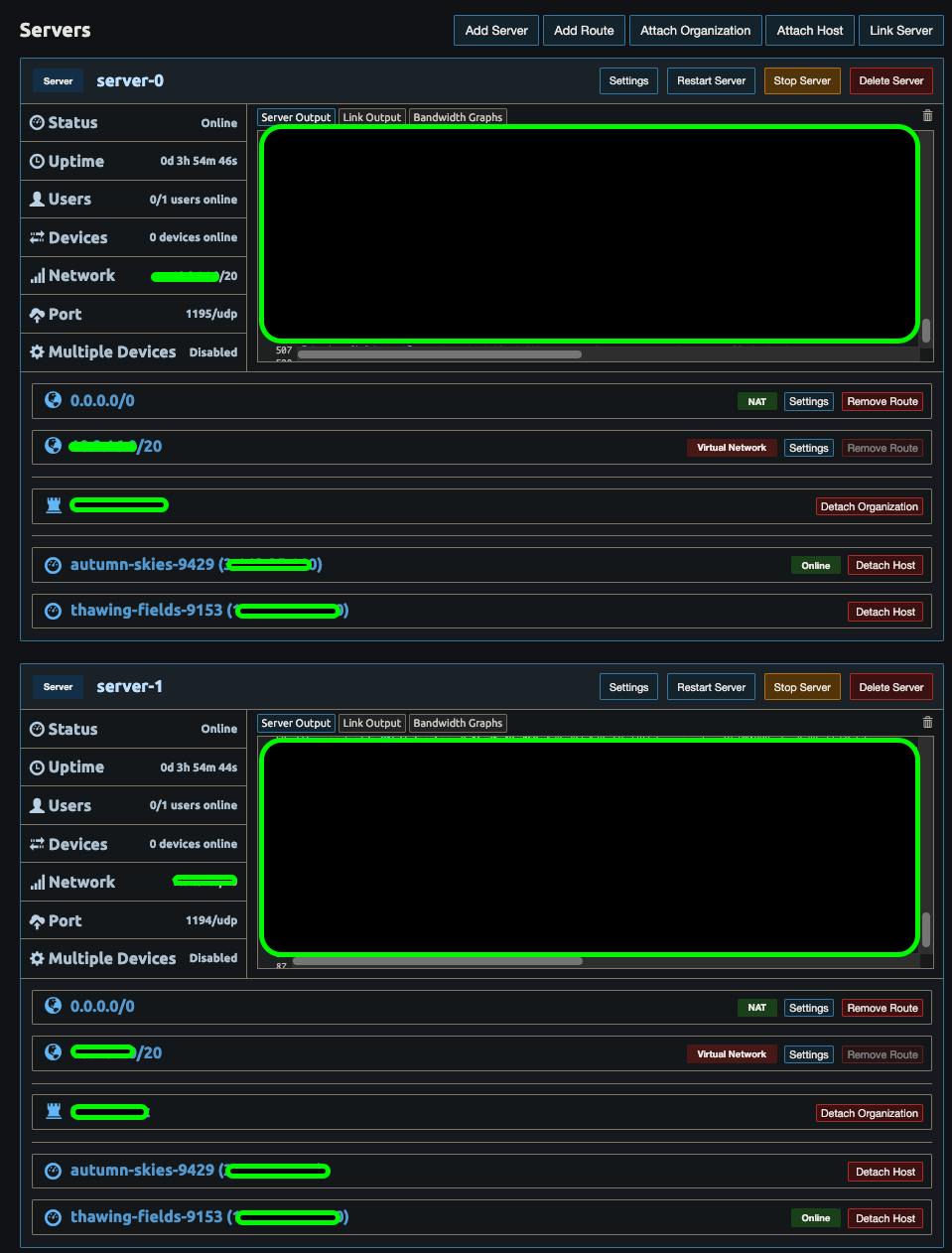
Hello! We currently have OpenVPN close to 4000 connections to our IoT devices using 1 OpenVPN server. However, we have been seeing issues where we are receiving intermittent disconnects and servers retrying 5 times until a connection is secured. I would like to remediate this by switching over to Pritunl. (A company I had worked for had Pritunl route traffic to 3 servers and it worked great for them.)
Which brings me to my questions:
Does Pritunl have documentation on load-balancing and high-availability architectures in AWS? (i.e. Terraform, wiki info)
I would assume NLB would be used in front for these connections; however, we use ALB for connecting to our IoT devices. This can prove problematic but wondering if there is a need for NLB.
I see Pritunl uses MongoDB. Is it possible to use another db like Postgres?
For us to load balance and have high-availability, do I need to purchase the Pritunl Enterprise license?
Appreciate the feedback and looking forward to working with Pritunl.
Typically one server won’t be able to handle more than 2000 connections. There’s no need to use network load balancers. After adding multiple hosts attach the hosts to the server and increase the replication count in the server settings. The client will automatically select a random host when connecting. This requires an enterprise subscription.
Purchase 2 Enterprise Licenses of Pritunl to sync to these 2 servers. (If I need to add another, I’ll by another.)
Questions to move forward in installing Pritunl @zach:
Am I understanding each “host” is each EC2 instance being $70/month per EC2 instance? (e.g. 2 Pritunl servers is $140/month?)
I am considering setting up a NLB but having second thoughts. You have said there isn’t really a need so I’ll take it to heart. If what I’m understanding Pritunl will load balance the connections between the 2 servers?
In my application, I need to connect to 4000+ devices like what was mentioned. In my current setup, I have an Elastic IP on my OpenVPN server where in AWS we use an A record in Route 53 of a name fire.foo.com. From this, how would this work when it comes to growing more Pritunl servers? Do I create an Elastic IP for each Pritunl server? (Sounds bad since you can only have 5 Elastic IPs in your NAT Gateway.) Trying to see what can be done where I can use fire.foo.com and have each IP map to each Pritunl Server. I could do this setup but unsure if this is the way: Amazon Route 53: How to automatically update IP addresses without using Elastic IPs - DEV Community
Yes each host is billed at $70/month. The load balancing will already be handled by the Pritunl Client. It doesn’t need to be an elastic IP once a DNS name is configured the client will store the DNS name of each host. These can be changed later. Below are all the addresses and how to configure them.
Hosts Tab
Host Public Address: The public IPv4 address or domain of the Pritunl host. This should always be the public IP of the host for all configurations even when using a load balancer.
Host Public IPv6 Address: The public IPv6 address or domain of the Pritunl host. This should always be the public IP of the host for all configurations even when using a load balancer.
Host Sync Address: In the advanced host settings. The public address or domain that the web server of the Pritunl servers can be accessed from. If a load balancer is configured that address should be set here.
Top Right Settings
Connection Single Sign-On Domain: Only shown when using single sign-on connection authentication. The public address or domain that is used to validate single sign-on requests through the Pritunl web server for a new VPN connection. If a load balancer is configured that address should be set here. Requires valid SSL certificate.
@zach I have stood up Pritunl and looks good. Going based off what you have stated. I’m not understanding the layout. I just need to clarify a number of subjects:
As we grow our company to let’s say 10k devices using OpenVPN, my understanding is to create 10 Servers in a Pritunl EC2 instance (each supporting 2000 max devices) where we then replicate the Servers into another Pritunl server (the other being the Pritunl Host).
Is my understanding correct that having a multi-host server is mainly for High Availability so if 1 server goes down we still have the other to take it’s place?
This goes back to what you stated being before:
Attach the Pritunl Host to the Pritunl Servers —> Replication Count —> 2
Configure a DNS name via Pritunl Host —> update this in Route 53 to connect to the dns name?
No a replicated server is intended to scale for larger configuration. Attaching multiple hosts without increasing the replication count will only provide improved availability.
The most important option to configure is the sync address in the advanced host settings. This must be a DNS name that will always be available to the client. This will ensure when hosts are added or removed the client is able to sync the new configuration.
Each host public address can use the default detected public IP or be configured with DNS entries. Both will work.
@zach Thanks for the reply Zach. Currently setting up Pritunl with MongoDB.
We purchased the 1x Enterprise License to test it out and couple of questions which I believe will be figured out once I have this setup.
If we are to sync the MongoDB cluster to both Hosts (aka. EC2 Pritunl Hosts), we should see the Hosts in both instances of Pritunl?
The Sync Address in the Advanced Host Settings, when you mention a DNS name you are speaking on fire.foo.com which would contain both public IPs of the 2 EC2 Pritunl Hosts in AWS Route 53? It sounds like from what we have spoken on that there is no need for AWS Route 53 record? I’m confused on that statement.
The hosts need to connect to the same MongoDB. If the hosts are cloned the /var/lib/pritunl/pritunl.uuid file needs to be deleted.
A DNS entry needs to be created for the sync address. It can contain one IP or both IPs. It can be a load balancer or just multiple IPs. Either way it won’t effect availability because a configuration sync won’t stop the connection if the host in the sync address were to go offline. It just needs to be configured so that the client will always has an address of where to sync the configuration. As long as this is done correctly any other IP addresses can be modified at any time.
@zach Thanks again for all your help. I have successfully setup Pritunl where connections are coming into our Hosts. A question to understand best practices moving forward.
I setup 2 Pritunl Hosts with soon to be 10 Pritunl Servers where Max Clients is 2000 devices. I see in the blog post back in 2016 Pritunl 20k Clients. Testing 20k Concurrent Clients | by Pritunl | Medium where you have only 1 Pritunl Server and 10 Pritunl Hosts load balancing the traffic. I was under the impression Pritunl Servers would load balance the connections inbetween the Servers and have the Pritunl Hosts to load balance with each other. Is my understanding flipped? And if that’s the case, what would be the reasoning to having more than 1 Pritunl Server?
I guess for multiple device connections, the next step is move away from OpenVPN and go with Wireguard for so many connections, right?
Once replicated servers are configured by increasing the replication count in the server settings the server will run on multiple hosts. The client will then randomly select a host when connecting.