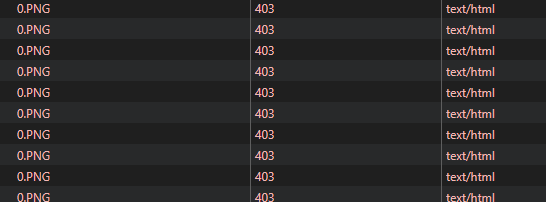
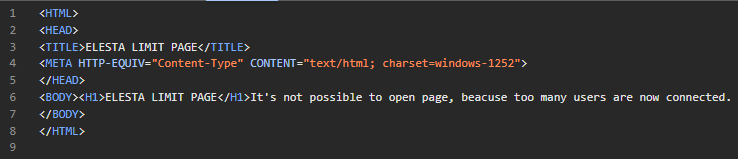
I am experiencing an issue with Pritunl Zero when upgrading from version 1.0.3265.55 to a more recent version. I am unsure whether this issue has existed since version 1.0.3292.11 or 1.0.3324.37. I definitely had the issue in version 1.0.3324.37, but I never tried version 1.0.3292.11. However, the issue is still present in the latest version, 1.0.3444.47.
Some background: I use Pritunl Zero to publish a variety of internal web interfaces for building automation devices over HTTP. The integrated website of these devices blocks the connection when a client makes too many requests in a short period of time.
Version 1.0.3265.55 is working as expected. The sites load quickly without any errors. However, as soon as I upgrade Pritunl Zero, the sites load much more slowly after logging in to the Pritunl login page, and the device blocks the page due to too many requests.
It seems that Pritunl Zero is performing too many retries, resulting in the user receiving an error message from the device’s website (too many requests).
Some specs of my environment:
Pritunl Zero runs on an Ubuntu 20.04 LTS machine with an active Ubuntu Pro subscription (Azure)
Access to internal websites is via HTTP
Pritunl Zero is published directly to the internet via port 443 with a Let’s Encrypt certificate
I have been using Pritunl Zero in this way for about four years without any issues
When checking the github release page, the following modifications have been made since the last working version:
Add support for HTTP/2 services
Fix web app history events
Improve HTTP/2 service support
Improve node service selection
Fix max user experation date
Add paging and condensed view for all resources
Add cli configuration commands
Add isolated systemd redirect web server
Isolated web server improvements
Web interface improvements
Could any of these changes be causing my issue? I have currently restored the VM to a state prior to updating Pritunl Zero and updated everything except Pritunl Zero, just to have a working system.
Hi zach
I’ll have to test this in a quiet minute. But I know that I received multiple 403 errors in the developer tools. Are there any relevant logs that could help with troubleshooting this issue? I had no log entries indicating any errors in Pritunl itself.
Hi zach
I did some more testing in the meantime. The issue is still happening in the latest version, v1.0.3565.94. I also got some logs, but I can’t really see a redirect loop. The app tries to get resources from the server, which has a rate limit that blocks requests after a certain time due to too many requests.
As soon as I install version 1.0.3265.55, everything goes back to normal. I can just install the working version over the newest version and this solves the issue. I’m pretty sure the problem’s in one of the latest versions.
Any ideas how I can troubleshoot this to find out where the issue is? I’m stuck with a pretty old version of Pritunl Zero right now, about a year old. I can’t upgrade because of this issue.
I could also send you some logs if that would help.
I updated to v1.0.3648.46 today and the bug that affected all versions last year seems to have disappeared. I wasn’t able to reproduce the issue, and I didn’t even need to adjust the router settings you suggested last time.
I don’t know which change fixed the behaviour, but everything seems to be working now. I’ll keep an eye on it over the next few days to make sure it’s definitely fixed.
Thanks a lot
EDIT: The problem was not completely solved. I still hat to execute the following commands:
sudo pritunl-zero set router max_idle_conns 50
sudo pritunl-zero set router max_idle_conns_per_host 2
After executing them and restarting the service, it looks better now
I don’t think there were any changes that vm would have effected this. Something you may want to check is try disabling or enabling preloading pages in Chrome. Then open Chrome developer tools hold shift right click the refresh button on the main window and select empty cache and hard reload. Then close the developer tools and reopen the page, the developer tools must remain closed to create prefetched requests. It will disable prefetching while developer tools are open.
One issue I discovered is if a logout path is configured Chrome may prefetch that page causing an unexpected logout. This was fixed in 47d402b to ignore prefetch requests for a logout. This would cause a 401 error not the 403 issue you are having. But if your browser was attempting to prefetch content it can create very difficult to reproduce problems because the prefetching is unpredictable.
I did some further troubleshooting and still encountered rate limiting errors. However after disabling idle connections with:
sudo pritunl-zero set router disable_idle_connections true
the behaviour changed. I’m still getting 403 errors, but I couldn’t reproduce the rate limits and the page loaded correctly. I’ll keep Pritunl Zero on the latest version with idle connection disabled and I’ll test this over the next few days.
Disabling prefetching with the developer tools open did not make any difference — I still got the same errors. However, emptying the cache and performing a hard reload works without issue (once the page has loaded, I can reload it without any problems).
Still not sure where the issue really is, as it worked without problems until version 1.0.3265.55. However, not all pages have this issue, even with the newest version. But as I don’t get any rate limits after disabling idle connections, the issue doesn’t seem that significant anymore.
I am still unable to use the new version reliably. Since installing version 1.0.3265.55 solves all the issues, there must be a connection with the newest version somewhere. Could the implementation of some form of parallelism lead to multiple requests in a short time frame? This could lead to too many connections, which the web server would reject with an HTTP 403 error after some time.
Do you have any ideas or suggestions on how to troubleshoot this further?
I did look through the source and changes again. I don’t see any other potential problems. It’s possible this was caused by an update to a library. In the next release I will update web server related libraries to include any possible fixes.
Thank you very much for your reply. Do you know when the next release is planned? I currently have to keep my instance on version 1.0.3265.55. With this version, I am unable to reproduce any issues. All pages load correctly.
It may be next week but to be able to solve this issue I would need to be able to replicate the errors. It’s most likely incorrect handling of limits by the internal web service. It needs to account for a reverse proxy configuration where all requests are coming from the Pritunl Zero server and instead use the X-Forwarded-For header for limits.
I believe I have found the cause of the issue. When HTTP/2 support was added, even if not enabled at the service level, the Pritunl Zero web server will allow HTTP/2. This allows the browser to use HTTP/2 multiplexing, which significantly increases the speed and number of concurrent requests that can be sent, causing an increase in the speed of HTTP/1 requests going to the backend server. The web server in your internal service is still broken and needs to be adjusted to handle the request rates that HTTP/2 is capable of, given the client-side JavaScript making those requests.
The next release will include an option in the node settings to enable HTTP/2 and it will be disabled by default. You should make sure this option and the service HTTP/2 option is disabled.
Thank you for your analysis. That sounds promising. Yes, the web servers are definitely not optimal. Unfortunately, however, these are limited servers from building automation systems over which I have no real influence (as the hardware is also limited).
In the meantime, I tested the latest version and can confirm that the issue no longer occurs. So it really was the HTTP/2 multiplexing that was causing the issues.