The CLI client has commands to import profiles. There is an API handler GET /key/<org_id>/<user_id> that will return a JSON struct with the uri_url. This can then be added to pritunl://domain to create the URI that can be imported into the client.
Since I got the VPN server working on Pritunl, we want to create mapping of the MAC SSID being like so: 3f3f3ff3gg.foo.com, 2h3h3h43kk.foo.com, etc.
Previous concept:
Use Ansible to ssh into IoT devices
Add a ovpn.profile
Connect to the openvpn server
New concept:
Use Ansible to ssh into the IoT devices
Upload api token and secret onto IoT devices
Create the user using the MAC SSID and upload to Pritunl Server to be synced
Use the Python API Client to grab the temp URL token
Install pritunl-client and grab the temporary token URL that was pulled to import the profile and add via pritunl://domain
The issue that we are facing is our current IoT devices are on our original OpenVPN server. The connection will fail if we switch from the OpenVPN server to Pritunl where the SSH connection will drop.
What would be the most best/secure route to this?
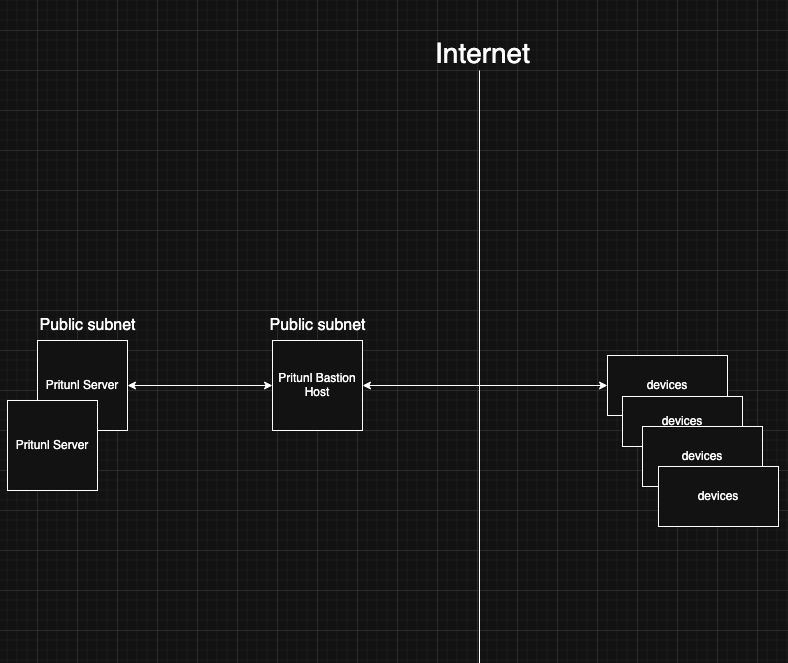
UPDATE: I have been brainstorming where I create a Pritunl Bastion Host which communicates to the Pritunl Server. When a IoT device boots up for the first time, it will ssh into the Bastion Host which holds the API token and secret, create a user, pull the profile link, grab the tar file, and move the tar file to the IoT Device, and finally use pritunl-client to add the profile and connect.
The connection can be set to enable with sudo pritunl-client enable <conn_id> this will enable it to start on the next restart. The existing OpenVPN connection can be set to disconnect on the next restart.
The OpenVPN ChaCha20-Poly1305 cipher option in the Pritunl server settings should also be used for ARM devices. This will provide better performance as ARM devices don’t have AES-NI.
Thank you on the cipher option! We have a process of curling into our server and have that be used to access our devices rather than our previous being sshing.